Built for analysts
For anyone but an analyst, the dashboards were far too technical.
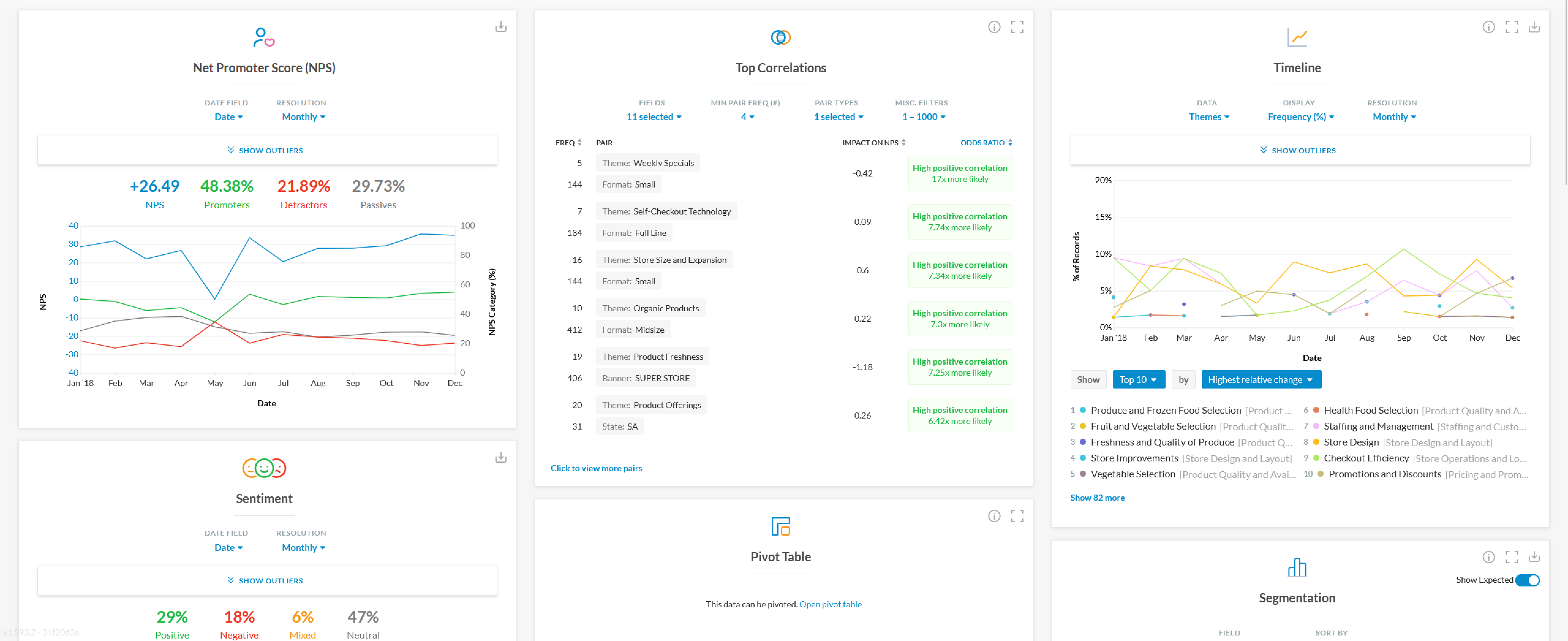
Kapiche’s original dashboards were a grid of widgets covering NPS, sentiment, timelines, segmentation and correlations. Every one of them asked the reader to do work before it told them anything. Each widget carried its own controls for the date field, the resolution, the fields to include, a minimum pair frequency or a choice of pair types. The results arrived as odds ratios, impact on NPS and percentages of records over time. I designed those dashboards and the widgets in them, and kept refining them as customer feedback came in. Every Kapiche account used them, and they became the core feature, adopted over an older, much less sophisticated query page.
For an insights analyst that level of control was the point, since it let them interrogate the data however they needed. For everyone else who opened Kapiche, including the support managers and executives who used it to check on things or to report upwards, it was far too technical. The effort of configuring and then interpreting each chart meant most of them never got as far as the insight it contained.
Iterating from customer feedback
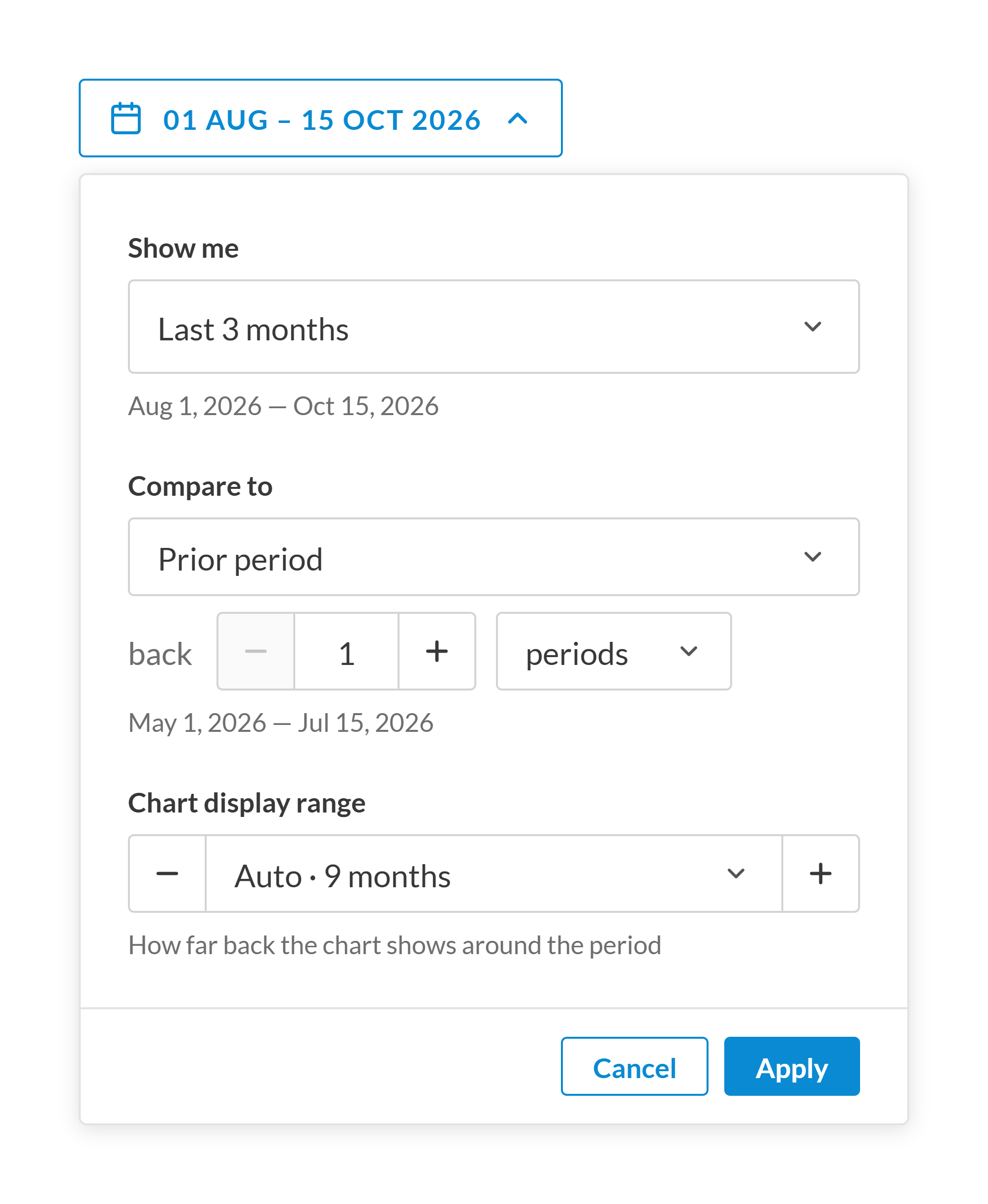
One date picker for everyone, with defaults that work without opening a menu.
The date picker is one example of that iteration. Customers could only compare a period against the previous month. The question underneath most investigations is whether what someone is seeing is new, and the dashboards answered it only by accident. It was the most frequent request reaching our customer success team, raised by 70% of our accounts.
- Considered
- The first version had two states, simple by default with an advanced toggle for the comparison periods and shortcuts analysts needed. Everyone else needed a date range and nothing more, so the toggle kept the extra options out of their way.
- Chose
- One state for everyone. After I showed it to customer success, their feedback led me to remove the advanced toggle in favour of usability for all users. Shortcuts sit in one menu grouped into calendar, rolling and custom periods, the comparison defaults to the prior period, and the chart display range sets itself. Afterwards, the request only came from a few customers with specialised needs.
- Trade-off
- Every user sees every option, so the defaults have to be right for someone who never opens a menu. It solved the problem it was aimed at, but it also made the larger one clearer. A better date picker couldn’t give non-analysts anything the dashboards weren’t already built to say, and the dashboards were built to answer an analyst’s questions.
From charts to headlines
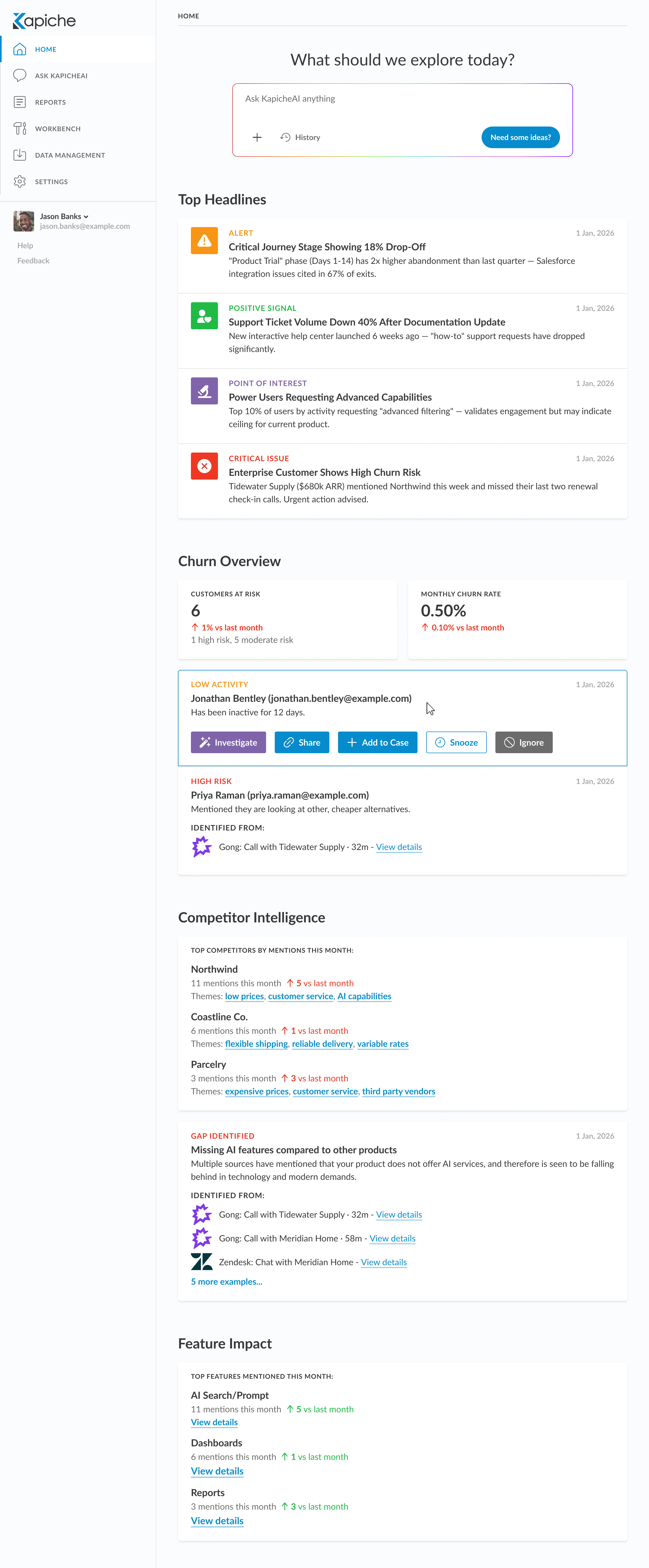
The home screen opens with finished statements instead of charts to read.
The home screen I designed next starts from the other end. Instead of charts to read, it opens with headlines, each one a sentence stating what changed and why it matters. Each is labelled as an alert, a positive signal, a point of interest or a critical issue, and dated so the reader knows how fresh it is. A drop-off in a customer journey stage, a fall in support tickets after a documentation change, or an enterprise customer mentioning a competitor before missing two renewal calls each arrive as a finished thought rather than a pattern waiting to be spotted.
Below the headlines, the screen groups what used to be separate widgets around the questions people bring to it. The churn overview names the individual customers at risk and why, with actions to investigate, share, add to a case, snooze or ignore right on the card. That way, an insight can become work without leaving the page. Competitor intelligence and feature impact follow the same pattern. Wherever a claim is made, the calls and chats it was identified from sit underneath it as evidence, one click from the source. A prompt at the top lets anyone ask a question of their own in plain language.
The analyst’s tools wouldn’t disappear, and the original dashboards would stay available for the people who needed them. The aim was that nobody would have to become an analyst to find out what their customers were telling them.
What AI changed in the workflow
AI now sits inside nearly every step, but it hasn’t removed a single judgment call.
- 01Problem from research or analytics
- 02Understand
- 03Explore responses
- 04Prototype and test with customers
- 05Build and ship
My process hasn’t changed much in shape. It starts with a problem that surfaced from customer research or analytics, and moves through the usual phases of understanding it and exploring responses. It then gets prototyped and tested with a small group of customers before it goes anywhere near a general release, and ends with something built and shipped. What has changed is that AI now sits inside nearly every one of those steps, from distilling research through prototyping and into the final build.
What it hasn’t done is remove a single judgment call. Across three recent builds I went back and counted the design decisions I had to raise and correct during the work. The total ran to a few dozen per project. Some were straightforward mistakes that anyone reviewing carefully would have caught. Rather more were the kind that don’t announce themselves as defects at all, things like type weight, spacing rhythm, colour semantics and the words in the interface. These tend to survive indefinitely once shipped because nobody ever files a ticket about them.
What the speed buys is more prototypes rather than earlier deadlines. Ideas that used to die as sketches, because they weren’t worth a day of building to test, can now be made real enough for someone to react to. That moves more of the exploration into things people can use instead of things they have to imagine. That only holds up because the work is validated with real customers before general release. Producing more and faster without something catching the mistakes is just a way of shipping the wrong thing sooner.
Where it went next
The headline home screen never shipped in Kapiche, but the idea carried into Carson. Carson was built around ease of use, and it lowers the learning curve by automating insights, so people don’t have to find them in the data themselves. Its home screen opens with the same kind of finished statements, ranked by revenue at stake, each with the conversations behind it one click away.